See It in Action
During a single lecture, SANGYU does all of this for you
Demo shows illustrative sample sentences, not an actual classroom recording
Moments every international student knows
01 / 08
"I followed the first ten minutes. Everything after was a guess."
As soon as the lecturer speeds up or leans into a local accent, the thread is gone.
HOW SANGYU HELPS
Every sentence appears with a live translation right underneath—glance up and you are immediately back on track.
02 / 08
"Two-hour lecture—my brain hits a wall after hour one."
Listening in a second language drains mental energy fast, leaving the second half a blur.
HOW SANGYU HELPS
Zone out for a moment? Captions & Live Summary stay right there, and Study Notes fill in the rest after class.
03 / 08
"Everyday conversation is fine—until accents and technical jargon hit."
One unfamiliar technical term or local expression can stall your understanding of the whole slide.
HOW SANGYU HELPS
Builds a subject-specific glossary for your course and explains tough concepts in plain language inside Study Notes.
04 / 08
"By the time I look up one word on my phone, the slide is gone."
Looking down to type into a dictionary means missing the lecturer's explanation of the next slide.
HOW SANGYU HELPS
Keep your eyes on the lecture. Technical terms are translated in context automatically.
05 / 08
"Everyone knew about the assignment—except me."
The lecturer mentions a deadline while people are packing up, and you miss that one sentence.
HOW SANGYU HELPS
Assignments, readings, and deadlines explicitly stated in class are pulled into a dedicated To-dos section.
06 / 08
"I recorded a 3-hour lecture—and never had time to replay it."
A raw 3-hour audio file is too long to scrub through before exams.
HOW SANGYU HELPS
One-click Study Notes let you review the key takeaways in minutes, and click any timestamp to jump straight to that moment in the audio.
07 / 08
"Finals week arrives—and my notebook is nearly blank."
You tell yourself you will organize your notes this weekend, and suddenly the semester is over.
HOW SANGYU HELPS
Every class leaves behind organized captions, audio, and Study Notes in your library.
08 / 08
"I didn't get it—and felt too shy to raise my hand."
You worry the question is too basic, or you aren't sure how to phrase it in the lecturer's language.
HOW SANGYU HELPS
Tap "Mark to review" on any confusing line, and Study Notes break it down in clear, plain language.
How It Works
One lecture, three simple steps
1In class: One tap to start
Pick your Microphone (in-person) or Browser tab (online lecture) and bilingual captions start appearing immediately.
La plasticità cambia le connessioni.
Plasticity changes the connections in the brain.
Auto-pauses on silence during breaks
2After class: Saved automatically
Saved locally on your device, and synced across your laptop, iPad, and phone when signed in.
3Review: One-click Study Notes
Turn the entire lecture into chapters, key takeaways, To-dos, and a subject Glossary in one click.
Neuroscience · Lecture 1
Why SANGYU
8 moments from the same lecture
General translators and meeting recorders are great tools—they just weren't built around university lectures. Here are 8 things that happen in every class.
Literal word-by-word guess or phonetic transliteration
frenologia → "frenology-uh?"Detects the subject and translates with a course-specific glossary
frenologia → Phrenology · NeuroscienceLabels "Speaker 1 / Speaker 2" and mixes student guesses into the summary
Speaker 2: Professor, is that still true?Automatically tags "Classmate" so student remarks never pollute Study Notes
ClassmateProfessor, does that still hold?Buried inside a 15,000-word transcript
Line 1,284 of 1,902Pulled into "To-dos" with the exact timestamp and original quote
✎ Tomorrow · Download portal readings · 41:52Leaves the mistake in your transcript with no warning
"Cranial-ology"Study Notes explicitly flag what was misheard live and show the correction
Cranialogy→ PhrenologyKeeps streaming empty room noise the whole break
10:00 still runningAuto-pauses on silence and resumes the moment the lecturer speaks again
Ⅱ Auto-paused on silenceGives a generic 3-paragraph summary while terms and tasks stay scattered
3-paragraph blurb + raw textTurns a 90-minute lecture into structured Study Notes: roadmap, chapters, To-dos & Glossary
📘 Study Notes · 65 pages · 26 chaptersDragging a 3-hour audio scrubber back and forth
03:02:47 ▸ 00:00:04Click any line to jump straight to that exact second of the recording
▶ Jump to 1:32:12Gives only raw translations, so next week's lecture sounds just as foreign
Translation onlyOrganizes key vocabulary, collocations, and academic expressions from every class
fare il punto · take stock / summarizeComparison reflects default behavior of general-purpose live translation and meeting tools; examples are illustrative.
Sample Study Notes
After class, your Study Notes do 8 things for you
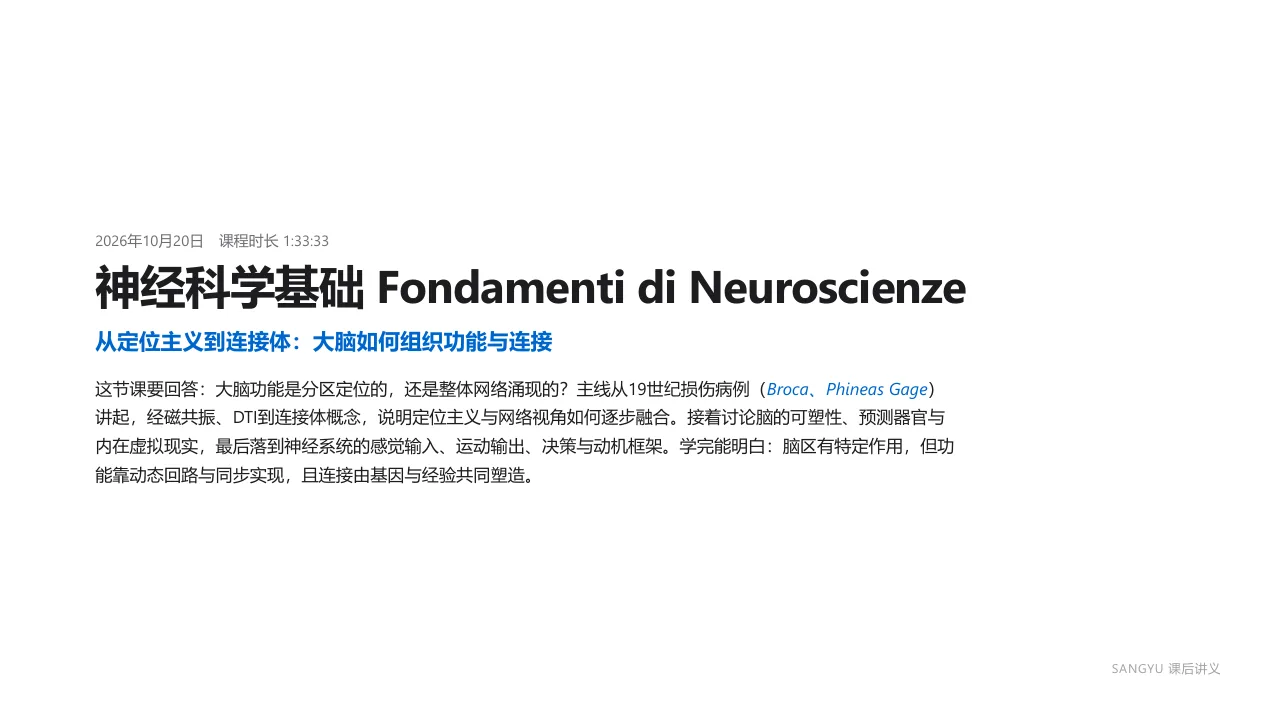
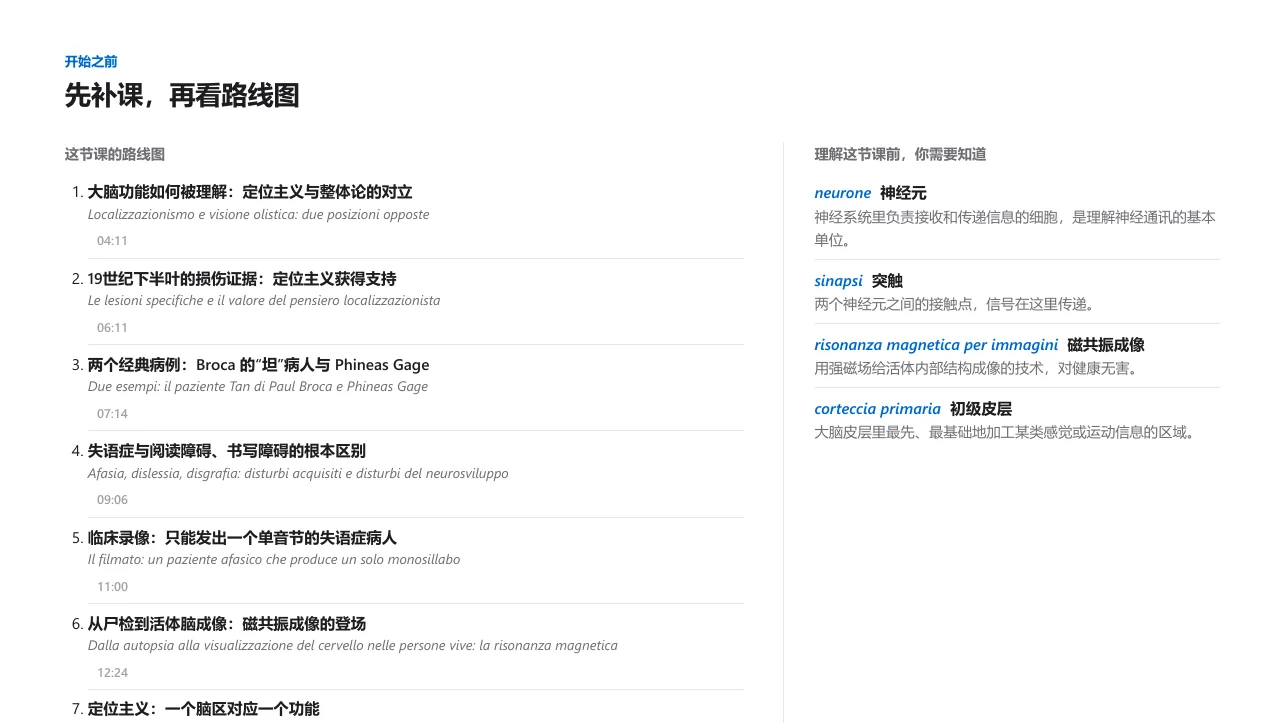
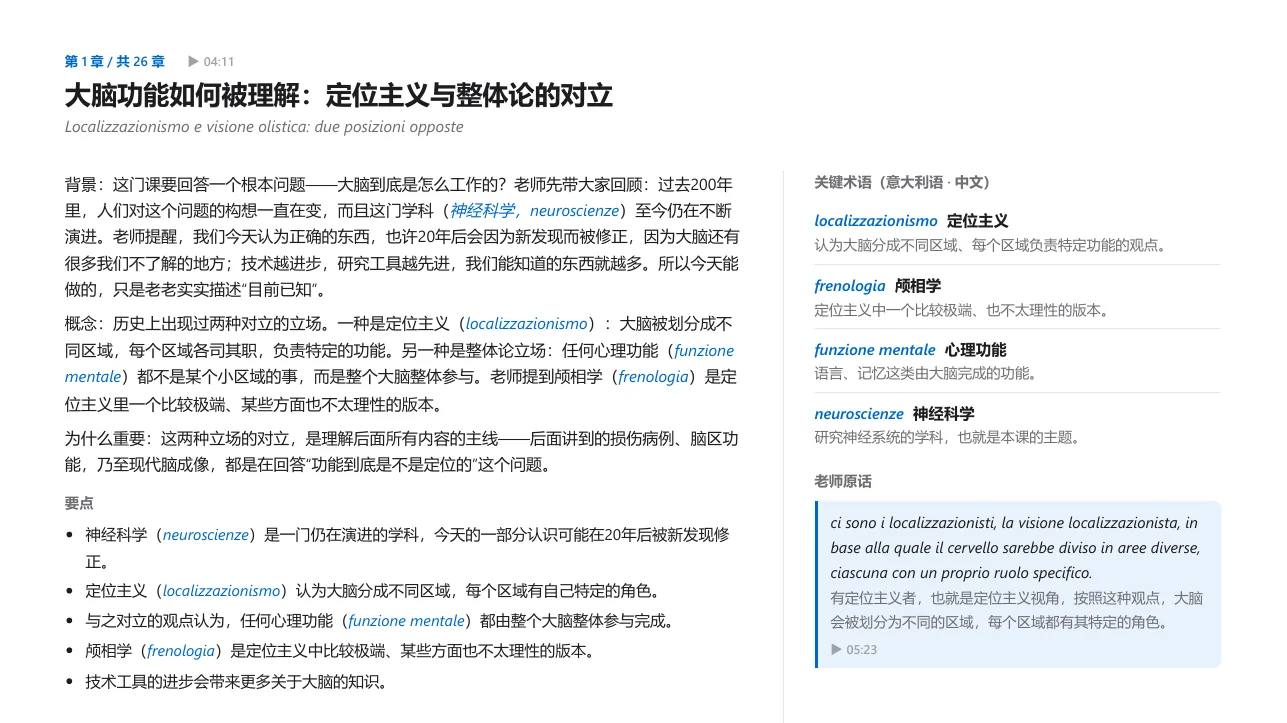
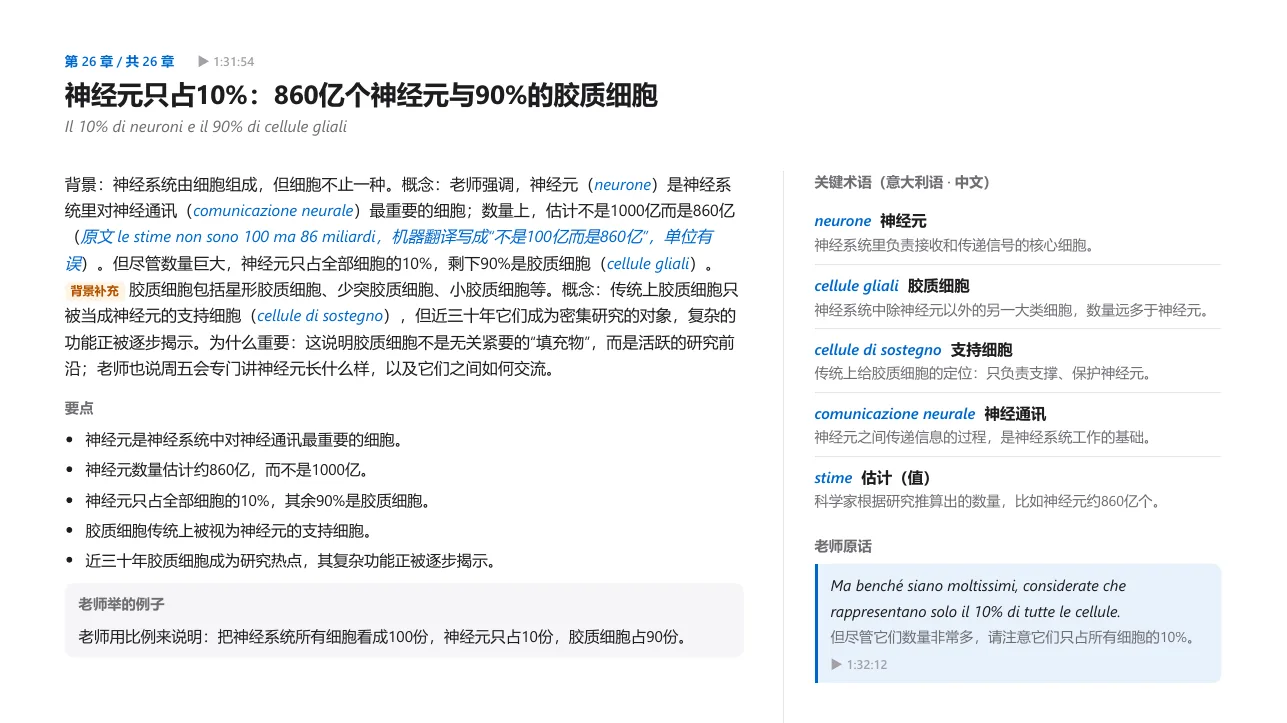
A 93-minute lecture organized into 8 core sections in one click (scroll or click any item to explore):
01Cover & Big Picture
Distills the core question the entire lecture sets out to answer
02Lecture Roadmap
Breaks 90 minutes into 26 timestamped chapters you can jump to anytime
03Chapter Breakdown
Plain-language explanations + original terms + what the lecturer actually said
04Live Caption Corrections
Catches and corrects terms that were misheard during live recognition
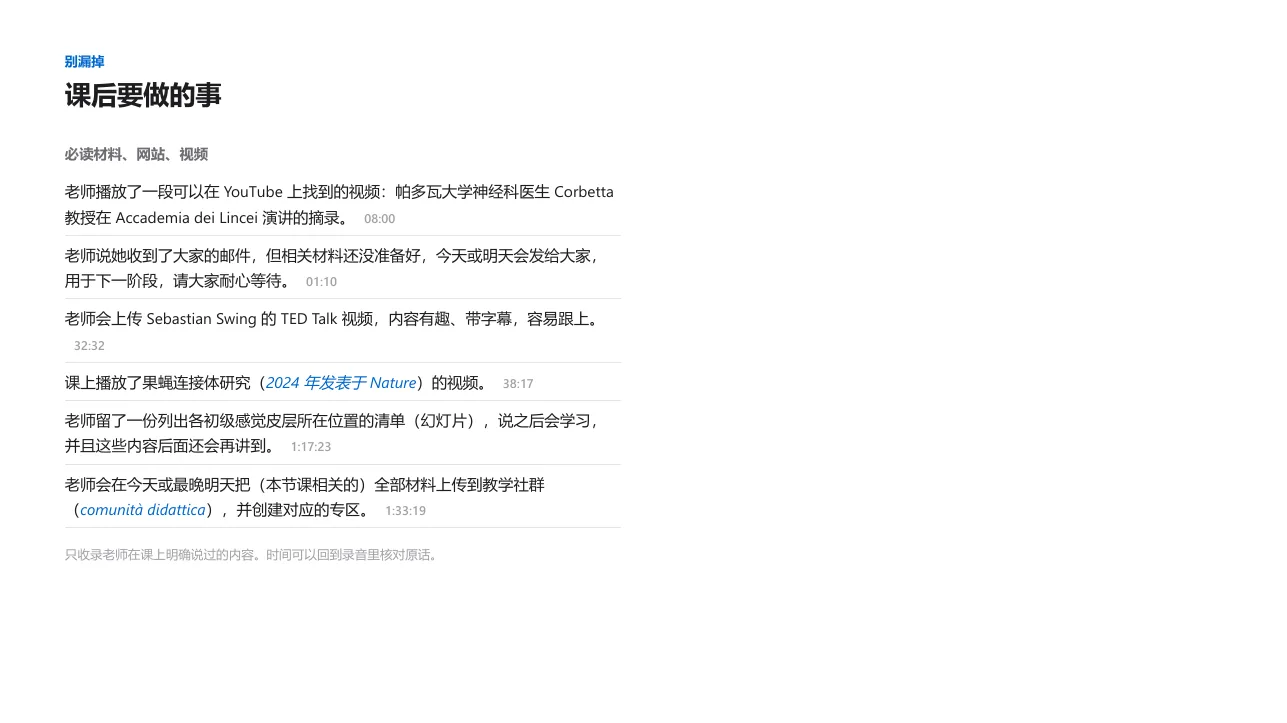
05To-dos
Only records assignments, readings, and deadlines explicitly stated by the lecturer
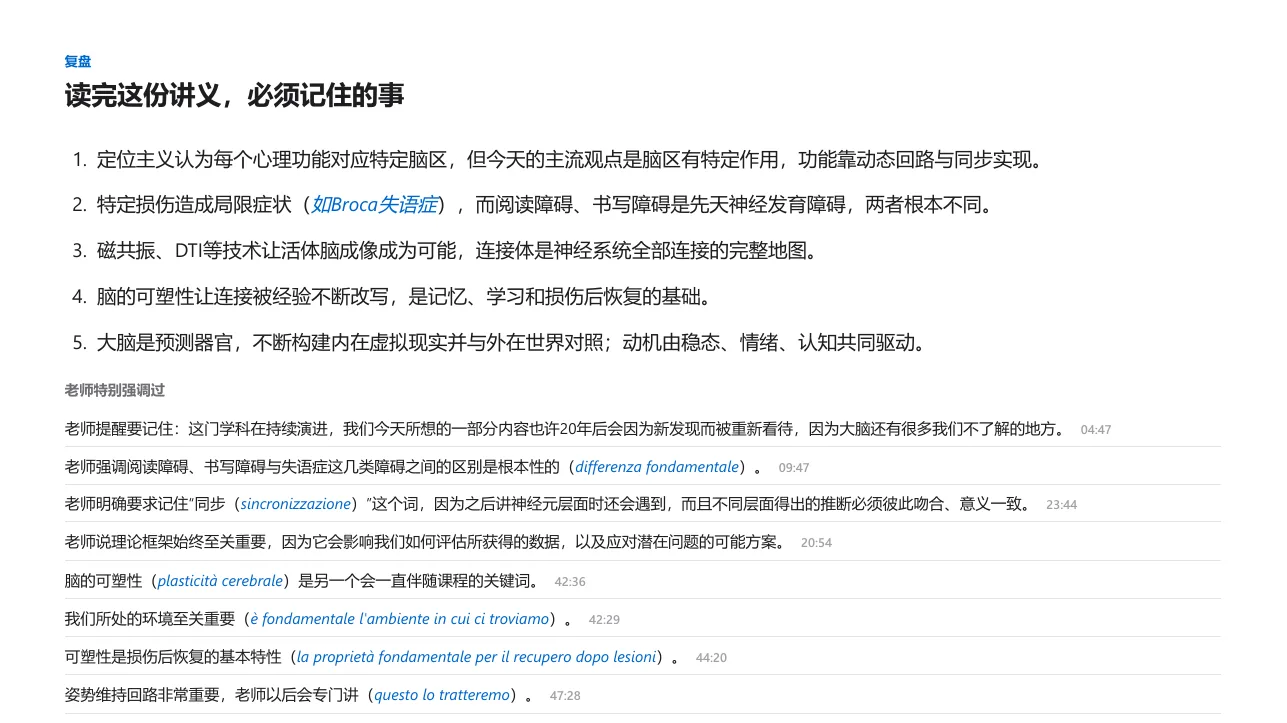
06Remember These
Essential takeaways and points the lecturer specifically stressed
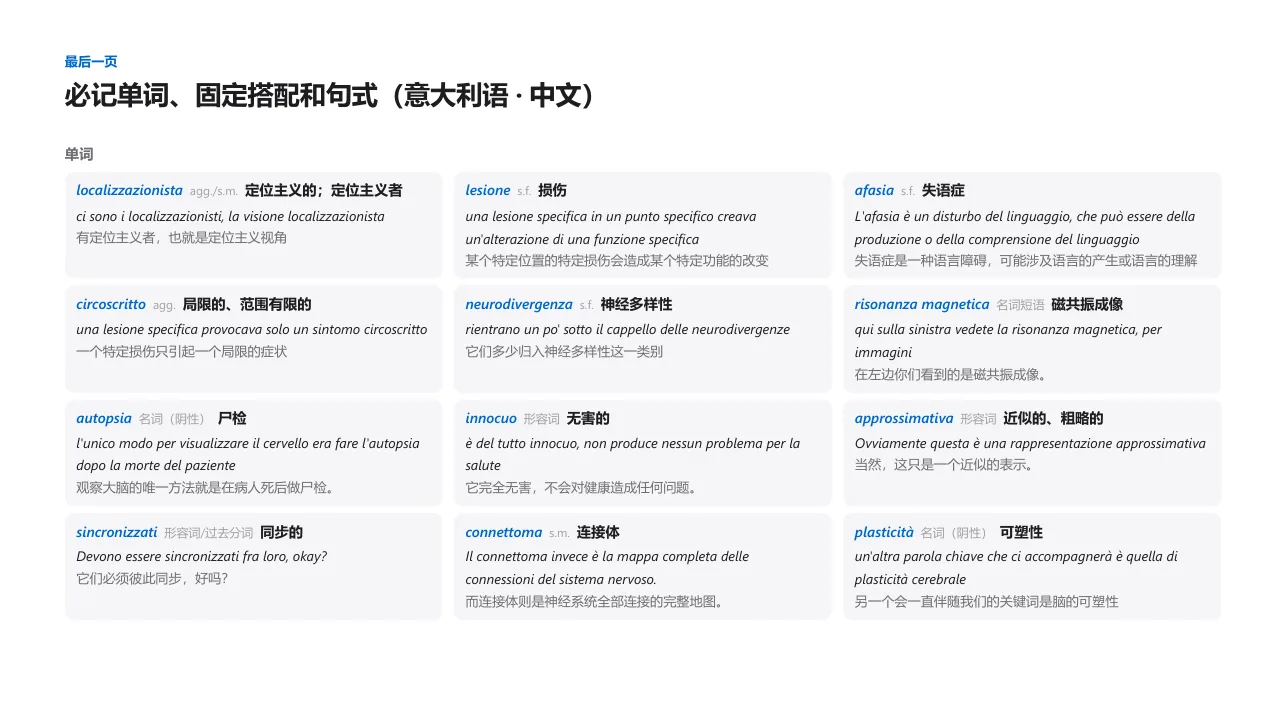
07Vocabulary & Expressions
Builds your academic language alongside your subject knowledge
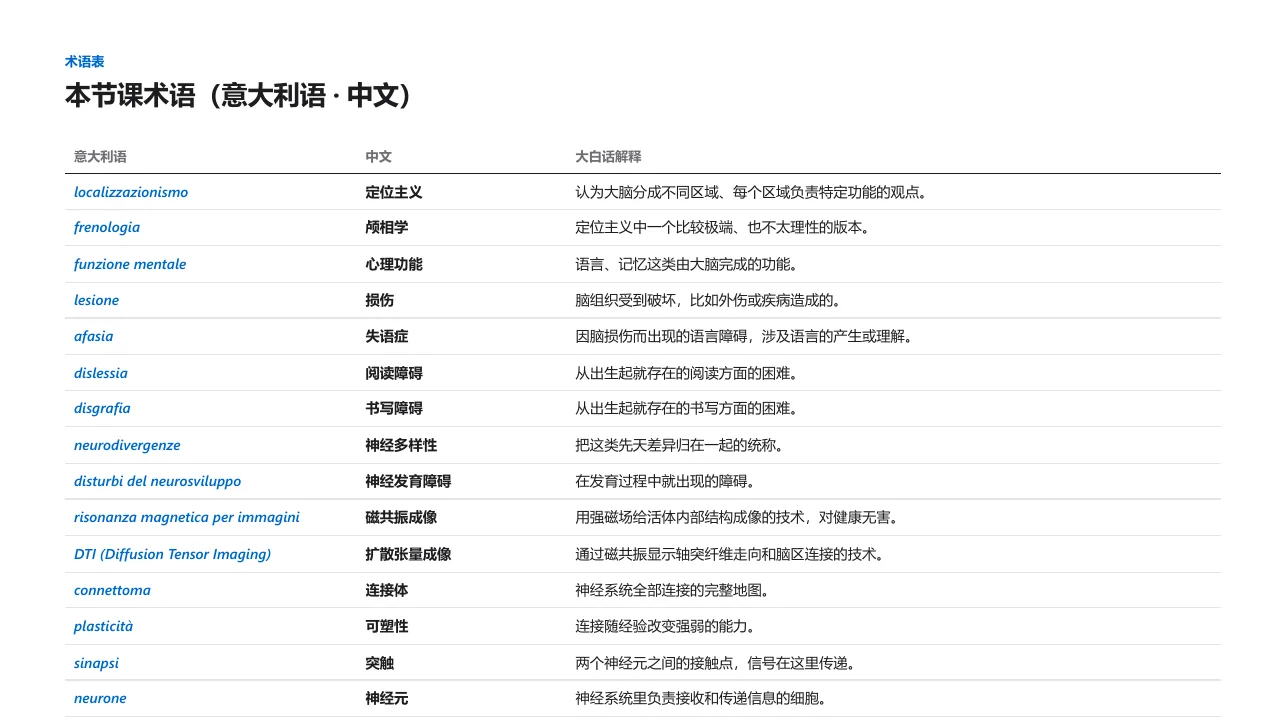
08Glossary
Domain terms with original word, translation, and plain-sense explanation
Beyond Lectures
Built for every moment of studying abroad
Group Discussions
Teammates switching between languages? Set spoken languages to Auto-detect and get live captions in your target language even when people mix languages.
Internships & Meetings
Follow along with live captions during team meetings and review key points and action items afterward without relying on memory.
Seminars & Office Hours
Attending a guest talk or advisor meeting where you only need a transcript? Turn off translation and use Transcribe only mode.
Thoughtful Details
Built around how students actually study
Captures only this browser tab
Typing and room noise stay out
Neurons make up only 10% of brain cells.
▶ 1:32:12Golgi e Ramón y Cajal vinsero il Nobel nel 1906.
Golgi and Ramón y Cajal won the Nobel Prize in 1906.
Neuroscience_Lecture_01.srt
00:04:11 → 00:04:15
[Lecturer] How brain function is understood
00:04:16 → 00:04:19
[Classmate] Will this be on the exam?
To-dos · Neuroscience
Explicitly announced by lecturer
41:52 · Download readings from portal tomorrow
▶ Replay quotePricing
Currently in Beta — Free to Use
SANGYU is currently in beta and free to try with no credit card required. Official pricing plans will be announced in advance before any charges apply.
Beta Access
Free · No card required
Full classroom live translation and Study Notes generation are open during the beta period. Official pricing is not yet finalized and you will be notified ahead of time.
Try the BetaIncluded during beta:
- ✓Live bilingual captions & Transcribe only mode
- ✓One-click Study Notes & PDF / SRT export
- ✓Subject-aware translation & Lecturer / Classmate detection
- ✓Auto-pause on silence & click any line to replay audio
- ✓Cross-device account sync (Computer · iPad · Phone)
Schools & Student Groups
Contact Us
University departments, student associations, and teaching teams are welcome to contact us for group beta onboarding and academic partnerships.
Contact UsGet in touch for:
- ✓Group beta access for classes & clubs
- ✓Course & department inquiries
Note: Currently in beta; online billing is not yet enabled · Learn more about beta access
My lectures are in Italian / English / Japanese / German—does it work?
Yes. SANGYU supports live speech recognition and translation across 60+ languages—including Italian, English, French, German, Spanish, Japanese, Korean, Arabic, and Chinese—and generates Study Notes in your target language.
What if the lecturer speaks fast, has a strong accent, or uses heavy jargon?
The closer your microphone is to the lecturer, the better the accuracy. SANGYU identifies the subject of your course to build a domain glossary, and you can click any line to replay the original audio. Always verify exam and assignment details against your lecturer's original announcements.
Does it work for both in-person and online lectures?
Yes. Use your microphone for in-person classes; on a desktop browser (Chrome or Edge), you can capture audio directly from the online lecture tab so keyboard typing and room noise stay out.
Do I need to download an app?
No app store download is required. Open app.sangyutranslate.com in your browser, or add it to your desktop / home screen on Windows, Mac, iPad, iPhone, or Android.
Is it okay to record in class?
Policies vary by university and instructor—please check that recording is permitted in your course. Recordings are strictly for your personal study.
Who can see my recordings and Study Notes?
Only you. Raw audio recordings stay locally on your own device; when you sign in and enable sync, your captions and Study Notes are isolated under your personal account. You can delete any session anytime or email us to close your account.
How much does it cost right now? Does it pause during breaks?
SANGYU is currently in beta and free to use with no credit card required; official pricing will be announced before billing begins. During class breaks when nobody is speaking, recognition pauses automatically and resumes when the lecturer speaks again.
How long do Study Notes take to generate, and can I export them?
Usually just a few minutes (please keep the page open while generating). Once ready, you can export printable PDF Study Notes and bilingual SRT subtitle files.
Make your next lecture the first one you don't have to guess through
Free during beta · No card required